When engaged in a duel, the game uses a series of damage counters to represent a Pokémon's remaining HP. If we replace this with a simple ratio (#/#), then we can save some screen space and give Pokémon cards HP values as high as 250, as opposed to the current limit, which is only 120. It's also slightly easier to read at a glance.
Fortunately, we'll only need to edit a single file, since all of the code pertaining to the various duel screens can be found in src/engine/duel/core.asm. There are 3 screens that use the damage counter display: the main duel screen, the play area Pokémon screens, and the initial card page of any Pokémon that was put into the play area. Since the latter 2 rely on the same function, we'll start there. Locate PrintPlayAreaCardInformation. Since the changes we'll be making to the function are so extensive, it will be easier to replace the entire section of code relating to the damage counter display, rather than try to edit individual lines.
 PrintPlayAreaCardInformation:
 	...
 	inc c
 	ld a, SYM_HP
 	call WriteByteToBGMap0
-	ld a, [wCurPlayAreaSlot]
-	add DUELVARS_ARENA_CARD_HP
-	call GetTurnDuelistVariable
-	or a
-	jr z, .zero_hp
-	ld e, a
-	ld a, [wLoadedCard1HP]
-	ld d, a
-	call DrawHPBar
-	ld a, [wCurPlayAreaY]
-	inc a
-	inc a
-	ld c, a
-	ld b, 7
-	call BCCoordToBGMap0Address
-	ld hl, wDefaultText
-	ld b, 12
-	call SafeCopyDataHLtoDE
-	ret
-.zero_hp
-	; if fainted, print "Knock Out" in place of the HP bar
-	ld a, [wCurPlayAreaY]
-	inc a
-	inc a
-	ld e, a
-	ld d, 7
-	ldtx hl, KnockOutText
-	call InitTextPrinting_ProcessTextFromID
-	ret
+	ld b, 7
+	ld a, [wCurPlayAreaSlot]
+;	fallthrough
+
+; prints a Pokémon's HP as "#/#" (current HP value/maximum HP value).
+; adjusts printing to account for either 2- or 3-digit HP values.
+; if Pokémon has 0 HP, then prints "Knocked Out" instead.
+; input:
+;	a  = Pokémon's play area location offset (PLAY_AREA_* constant)
+;	bc = screen coordinates at which to begin printing the given Pokémon's HP
+; output:
+;	[wLoadedCard1] = all of the Pokémon's card data (card_data_struct)
+PrintCurrentAndMaxHP:
+	ld e, a
+	add DUELVARS_ARENA_CARD
+	call GetTurnDuelistVariable
+	call LoadCardDataToBuffer1_FromDeckIndex
+	ld a, e
+	add DUELVARS_ARENA_CARD_HP
+	call GetTurnDuelistVariable
+	or a
+	jr z, .zero_hp
+	cp 100
+	push af
+	jr nc, .current_hp_is_three_digits
+	; current hp is 2 digits
+	call WriteTwoDigitNumberInTxSymbolFormat
+	jr .next
+.current_hp_is_three_digits
+	call WriteTwoByteNumberInTxSymbolFormat
+	inc b
+.next
+	inc b
+	inc b
+	ld a, [wLoadedCard1HP]
+	cp 100
+	jr c, .max_hp_is_two_digits
+	; max hp is 3 digits
+	ld d, a
+	ld a, SYM_SLASH
+	call WriteByteToBGMap0
+	inc b
+	ld a, d
+	call WriteTwoByteNumberInTxSymbolFormat
+	pop af
+	ret nc ; return if the current HP value still uses 3 digits
+	; Pokémon's current HP is now only 2 digits,
+	; so make sure any previously printed final digit gets erased.
+	inc b
+	inc b
+	inc b
+	xor a ; SYM_SPACE
+	jp WriteByteToBGMap0
+.max_hp_is_two_digits
+	call WriteTwoByteNumberInTxSymbolFormat
+	pop af ; discard the stored current HP value before returning
+	ld a, SYM_SLASH
+	jp WriteByteToBGMap0
+
+; print "Knocked Out" instead of HP numbers if the Pokémon's current HP = 0
+.zero_hp
+	ld d, b
+	ld e, c
+	ldtx hl, KnockOutText
+	jp InitTextPrinting_ProcessTextFromID
The PrintPlayAreaCardInformation function will now print all HP values as a ratio, with the current value on the left and the maximum value on the right. It will also adjust the printing coordinates depending on the number of digits in the HP value, and like before, it will instead print text indicating that a Pokémon was KO'd if its HP drops to 0. Below are a couple of screenshots to illustrate the differences.
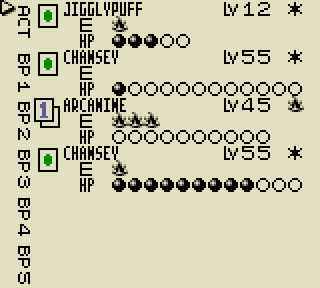
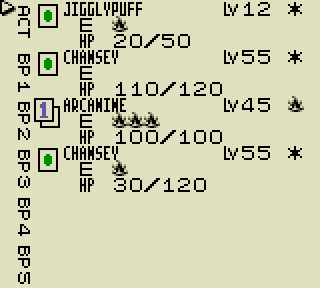
You may or may not have noticed that I wrote "Knocked Out" rather than "Knock Out" in the newly created comments for the above function. It's entirely up to you, but I would recommend adding the "ed" to the contents of KnockOutText in src/text/text1.asm before moving on to the next section, since that's the terminology used in the actual card game. This change will require an additional 2 bytes in that text bank, but if you haven't already done so, then you can delete the ds $d at the end of the file to free up 13 bytes. Otherwise, you might want to read Add New Text to learn how to move the text offsets into a separate bank.
The second change in src/engine/duel/core.asm will be far easier than the first since we can reference the PrintCurrentAndMaxHP function that we created earlier. Now, locate DrawDuelHUD, scroll down to the section that deals with printing the HP bar, and make the following edits.
 DrawDuelHUD:
 	...
 	ld b, [hl]
 	inc hl
 	ld c, [hl] ; wHUDEnergyAndHPBarsY
+	push bc
 	lb de, 9, PLAY_AREA_ARENA
 	call PrintPlayAreaCardAttachedEnergies
-
-	; print HP bar
-	ld a, DUELVARS_ARENA_CARD
-	call GetTurnDuelistVariable
-	call LoadCardDataToBuffer1_FromDeckIndex
-	ld a, [wLoadedCard1HP]
-	ld d, a ; max HP
-	ld a, DUELVARS_ARENA_CARD_HP
-	call GetTurnDuelistVariable
-	ld e, a ; cur HP
-	call DrawHPBar
-	ld hl, wHUDEnergyAndHPBarsX
-	ld b, [hl]
-	inc hl
-	ld c, [hl] ; wHUDEnergyAndHPBarsY
+	pop bc
 	inc c ; [wHUDEnergyAndHPBarsY] + 1
-	call BCCoordToBGMap0Address
-	push de
-	ld hl, wDefaultText
-	ld b, HP_BAR_LENGTH / 2 ; first row of the HP bar
-	call SafeCopyDataHLtoDE
-	pop de
-	ld hl, TILEMAP_WIDTH
-	add hl, de
-	ld e, l
-	ld d, h
-	ld hl, wDefaultText + HP_BAR_LENGTH / 2
-	ld b, HP_BAR_LENGTH / 2 ; second row of the HP bar
-	call SafeCopyDataHLtoDE
+	; print HP as #/# (current HP/max HP)
+	xor a ; PLAY_AREA_ARENA
+	call PrintCurrentAndMaxHP

 	; print number of attached Pluspower and Defender with respective icon, if any
 	ld hl, wHUDEnergyAndHPBarsX
 	ld a, [hli]
-	add 6
+	add 7
 	ld b, a
 	ld c, [hl] ; wHUDEnergyAndHPBarsY
 	inc c
And there you have it. You've successfully replaced the damage counter display with a numeric one. Seeing as it's no longer referenced anywhere, you might also want to delete the DrawHPBar function found further down in the same file.